
AI Paths & Behaviours
Platform:
Windows
Tools Used:
Unity,
Visual Studio - C#
Duration:
1 Week
04/2017
Team Size:
1
Role:
Solo Project - Everything

Overview
AI Paths & Behaviors – Download
Full Gallery of AI Paths and Behaviors
Team: myself - Solo Project
Game Controls: In-Game
Left/Right Arrow Keys – Change Entity Selection
1 – Pause Entity
2 – Reverse / Un-Reverse Path
3 – Make Angry
4 – Ping Pong Behavior
Space – Toggle Check Points On / Off
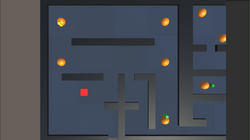
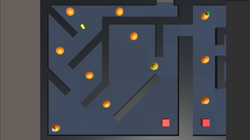
The monotony of game systems usually isn’t something a lot of players think of, but without the repetitive, dare I say, slightly predictable, behaviors one can find throughout any game, would they be as widely accepted? Whatever the answer is, these behaviors can be found in several games, if not all, and as such I made a point to learn how to go about creating something along those lines. Through the utilization of state-machines this project explored NavPoints and programming behaviors into basic geometry and expressing those behaviors through a multitude of colors.
Dev & Gameplay Pictures
 |  |
|---|---|
 |  |
 |  |
 |
Detailed Info
Solo Project - Everything
Since this was a solo project I created this game with only my know how and assets from the internet. Below is a list of some of the different hats I wore:
Developer
-
Custom scripted Characters Movement
-
Custom scripted various obstacles / enemies
Producer
-
Produce quality builds on a weekly basis
Game Designer
-
Worked to design unique and interesting paths for Entities



